
milvus-lite3.1.0
Published
Lightweight version of Milvus for local development and testing
pip install milvus-lite
Package Downloads
Authors
Project URLs
Requires Python
>=3.10

Milvus Lite - a lightweight, local Milvus for development and testing



Milvus Lite
Milvus Lite is a lightweight version of Milvus for local development, notebooks, tests, and small-scale AI applications. It exposes the familiar pymilvus API through a local .db file or an embedded gRPC server, so code written against Milvus Lite can move to Milvus Standalone, Milvus Distributed, or Zilliz Cloud with minimal changes.
This generation of Milvus Lite is rebuilt from scratch in pure Python. Instead of wrapping the full C++ Milvus core, it uses a local LSM-style storage engine with WAL, in-memory memtables, immutable Parquet segments, segment-level FAISS indexes, scalar filtering, BM25 full text search, and a Milvus-compatible gRPC adapter.
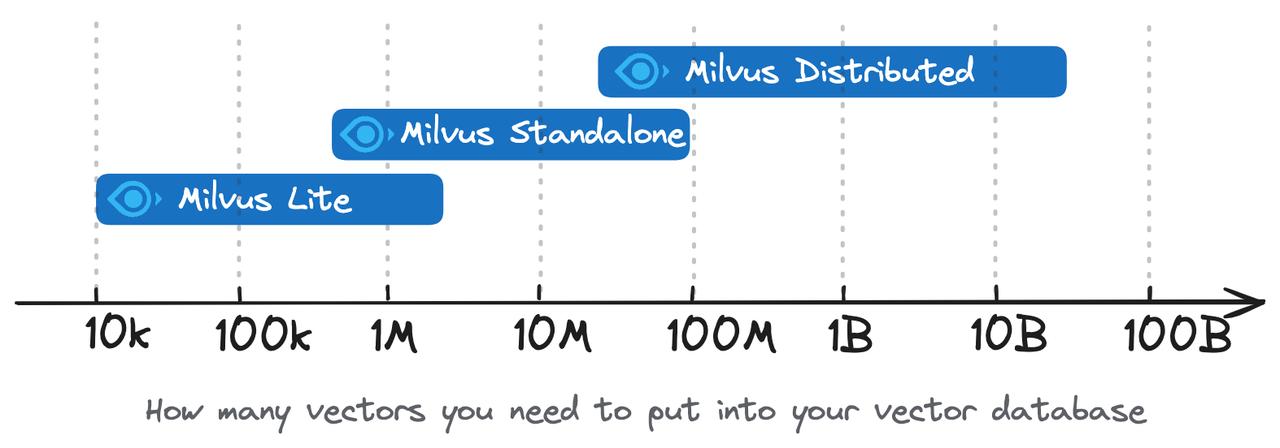
Milvus Lite is intended for prototyping and local workloads. For large-scale production deployments, use Milvus Standalone, Milvus Distributed, or Zilliz Cloud.
Highlights
- Drop-in local usage with
MilvusClient("./demo.db"). - Pure Python implementation with inspectable code and Python stack traces.
- Dense vector search, sparse BM25 search, and hybrid search.
- FAISS-backed indexes:
HNSW,HNSW_SQ,IVF_FLAT,IVF_SQ8, plusFLAT/BRUTE_FORCE/AUTOINDEX. - Milvus-style scalar filters, dynamic fields, JSON fields, array fields, partitions, aliases, iterators, and group-by search.
- Optional schema functions for BM25 and text embedding.
- Standalone local gRPC server for multi-client development.
Requirements
- Python 3.10 or newer
- macOS, Linux, or Windows where the Python dependencies are available
Core dependencies are installed by default: pyarrow, numpy, faiss-cpu, and grpcio. pymilvus is intentionally not a dependency of milvus-lite; it installs Milvus Lite as its local backend.
Installation
Install Milvus Lite directly:
pip install -U milvus-lite
Most users install Milvus Lite through the pymilvus extra:
pip install -U "pymilvus[milvus-lite]"
If you already have the original C++/CGo-based milvus-lite package installed, upgrade in a clean environment or reinstall it explicitly:
pip uninstall milvus-lite -y
pip install -U milvus-lite
.db files created by the original milvus-lite storage format are not compatible with this pure-Python engine. Re-import data into a new database; automatic migration is not available.
Quick Start
Local .db File
Passing a local .db path to MilvusClient starts Milvus Lite automatically.
from pymilvus import MilvusClient

client = MilvusClient("./demo.db")

client.create_collection(
    collection_name="docs",
    dimension=4,
)

data = [
    {"id": 1, "vector": [0.1, 0.2, 0.3, 0.4], "text": "python tutorial", "category": "tech"},
    {"id": 2, "vector": [0.2, 0.1, 0.4, 0.3], "text": "machine learning", "category": "ai"},
    {"id": 3, "vector": [0.9, 0.1, 0.1, 0.1], "text": "travel notes", "category": "life"},
]
client.insert("docs", data)

results = client.search(
    collection_name="docs",
    data=[[0.1, 0.2, 0.3, 0.4]],
    limit=2,
    filter="category in ['tech', 'ai']",
    output_fields=["text", "category"],
)
print(results)

rows = client.query(
    collection_name="docs",
    filter="category == 'tech'",
    output_fields=["text"],
)
print(rows)

client.delete("docs", ids=[3])
client.drop_collection("docs")
Standalone gRPC Server
Use server mode when you want a long-running local process or more than one client.
milvus-lite server --data-dir ./data --port 19530
from pymilvus import MilvusClient

client = MilvusClient(uri="http://127.0.0.1:19530")
Embedded Engine API
Use the internal Python engine directly when you do not need the Milvus protocol adapter.
from milvus_lite import CollectionSchema, DataType, FieldSchema, MilvusLite

schema = CollectionSchema(fields=[
    FieldSchema(name="id", dtype=DataType.INT64, is_primary=True),
    FieldSchema(name="vec", dtype=DataType.FLOAT_VECTOR, dim=4),
    FieldSchema(name="category", dtype=DataType.VARCHAR, max_length=64),
])

with MilvusLite("./data") as db:
    col = db.create_collection("docs", schema)
    col.insert([
        {"id": 1, "vec": [0.1, 0.2, 0.3, 0.4], "category": "tech"},
        {"id": 2, "vec": [0.2, 0.1, 0.4, 0.3], "category": "ai"},
    ])
    col.create_index("vec", {
        "index_type": "HNSW",
        "metric_type": "COSINE",
        "params": {"M": 16, "efConstruction": 200},
    })
    col.load()

    results = col.search(
        [[0.1, 0.2, 0.3, 0.4]],
        top_k=2,
        metric_type="COSINE",
        expr="category == 'tech'",
        output_fields=["category"],
    )
    print(results)
Full Text and Hybrid Search
Milvus Lite supports BM25 through Milvus schema functions. Text fields are analyzed on insert and written to a sparse vector field.
from pymilvus import DataType, Function, FunctionType, MilvusClient

client = MilvusClient("./fts.db")

schema = MilvusClient.create_schema(auto_id=True)
schema.add_field("id", DataType.INT64, is_primary=True)
schema.add_field(
    "text",
    DataType.VARCHAR,
    max_length=65535,
    enable_analyzer=True,
    enable_match=True,
)
schema.add_field("sparse", DataType.SPARSE_FLOAT_VECTOR)
schema.add_function(Function(
    name="bm25",
    function_type=FunctionType.BM25,
    input_field_names=["text"],
    output_field_names=["sparse"],
))

client.create_collection("articles", schema=schema)
client.insert("articles", [
    {"text": "machine learning algorithms"},
    {"text": "deep learning neural networks"},
    {"text": "database systems and search"},
])

index_params = client.prepare_index_params()
index_params.add_index(
    field_name="sparse",
    index_type="SPARSE_INVERTED_INDEX",
    metric_type="BM25",
    params={},
)
client.create_index("articles", index_params)
client.load_collection("articles")

results = client.search(
    "articles",
    data=["machine learning"],
    anns_field="sparse",
    limit=3,
    output_fields=["text"],
)
print(results)
Hybrid search combines multiple ANN routes, such as dense vector search plus BM25, with WeightedRanker or RRFRanker. Request-level FunctionType.RERANK is also supported for model rerank and numeric decay rerank.
Filtering
Milvus Lite implements Milvus-style scalar expressions for search, query, get, and delete paths.
client.query("docs", filter="age > 25 and status == 'active'")
client.query("docs", filter="category in ['tech', 'science']")
client.query("docs", filter="name like 'John%'")
client.query("docs", filter='array_contains(tags, "python")')
client.query("docs", filter="array_length(scores) >= 3")
client.query("docs", filter='$meta["color"] == "red"')
client.query("docs", filter="text_match(text, 'machine learning')")
Dump Data
Milvus Lite includes a compatibility dump command that exports a collection to local Milvus BulkWriter JSON files.
Dump a local .db database:
milvus-lite dump -d ./demo.db -c docs -p ./dump
Or dump from a running Milvus-compatible endpoint:
milvus-lite dump --uri http://127.0.0.1:19530 -c docs -p ./dump
The command reads rows through pymilvus query iterators and writes BulkWriter JSON files that can be used with Milvus Bulk Insert or Zilliz Cloud import workflows. Its pymilvus and BulkWriter dependencies are expected to come from the pymilvus installation that installed Milvus Lite. This is an export tool, not an automatic storage-format migration: original milvus-lite v1 .db files still need to be dumped from an environment that can open the v1 database.
Supported Features
| Area | Support |
|---|---|
| Vector types | FLOAT_VECTOR, SPARSE_FLOAT_VECTOR |
| Scalar types | BOOL, integer types, FLOAT, DOUBLE, VARCHAR, JSON, ARRAY, TIMESTAMPTZ |
| Metrics | COSINE, L2, IP, BM25 |
| Indexes | HNSW, HNSW_SQ, IVF_FLAT, IVF_SQ8, FLAT, BRUTE_FORCE, AUTOINDEX, SPARSE_INVERTED_INDEX |
| CRUD | insert, upsert, partial update, delete by ID/filter, get, query, search, truncate |
| Collection management | create, drop, rename, describe, statistics, aliases |
| Partitions | create, drop, list, partition-specific insert/search, partition key routing |
| Search features | dense search, sparse search, hybrid search, range search, group-by, iterators, offset, round_decimal |
| Schema features | auto ID, nullable fields, default values, dynamic fields, BM25 functions, text embedding functions |
| Text search | standard analyzer, optional Jieba analyzer, text_match, BM25 sparse inverted index |
| Adapter | Milvus-compatible gRPC server used by pymilvus |
Known Limitations
- Single process per
data_dir; Milvus Lite uses a file lock to protect local storage. - Single logical database namespace; database APIs expose the default namespace only.
- No authentication, users, roles, or RBAC.
- No binary, float16, or bfloat16 vector fields.
- No Product Quantization indexes.
- BM25 IDF statistics are segment-local rather than global.
- The engine is designed for local development and small-scale workloads, not distributed production serving.
Architecture
pymilvus client
      |
      v
adapter/grpc
      |
      v
engine/Collection
      |
      +-- storage/   WAL, MemTable, Parquet segments, deltas, manifest
      +-- search/    bitmap pipeline, scalar filters, dense/sparse executors
      +-- index/     FAISS indexes, brute-force index, sparse inverted index
      +-- analyzer/  standard and Jieba analyzers, BM25 term hashing
      +-- function/  BM25, text embedding, hybrid merge, rerank chains
      +-- schema/    data types, validation, Arrow schema builders
The storage path is LSM-tree style: writes go to the WAL and MemTable, flush creates immutable Parquet files, and compaction merges segments and garbage-collects tombstones. Vector indexes are bound to immutable segments one-to-one and persisted as .idx files. The manifest is the source of truth and is updated atomically.
Development
git clone https://github.com/milvus-io/milvus-lite.git
cd milvus-lite
make dev
source .venv/bin/activate
Common commands:
| Command | Description |
|---|---|
make test | Run the regular functional suite |
make test-fast | Run the fast local suite |
make test-core | Run schema, storage, search, index, analyzer, engine, function, rerank, embedding tests |
make test-compat | Run gRPC adapter and pymilvus compatibility tests |
make test-stability | Run slow crash and long-run stability tests |
make test-soak | Run explicit large-scale soak tests |
make benchmark | Run performance benchmarks |
make coverage | Run tests with coverage |
make build | Build wheel and source distribution under dist/ |
make serve | Start a local gRPC server via milvus-lite server on port 19530 |
make clean | Remove virtualenv, caches, coverage files, and build artifacts |
Documentation
Design notes are in docs/. Start with docs/modules.md for the file-by-file architecture, then read the focused design documents for WAL, filters, indexes, gRPC compatibility, full text search, and search iterators.
Contributing
Issues and pull requests are welcome. Please read CONTRIBUTING.md before sending larger changes.
License
Milvus Lite is licensed under Apache License 2.0. See LICENSE.